Testing discount code combinations at checkout

Marketing has the weekend's codes lined up. 30% off everything. 20% off a first order. One rule: one code per order. Nobody tried both at once. Both codes apply, and a £100 basket checks out at £56. That is £14 below the 30% path, on the busiest weekend of the year.
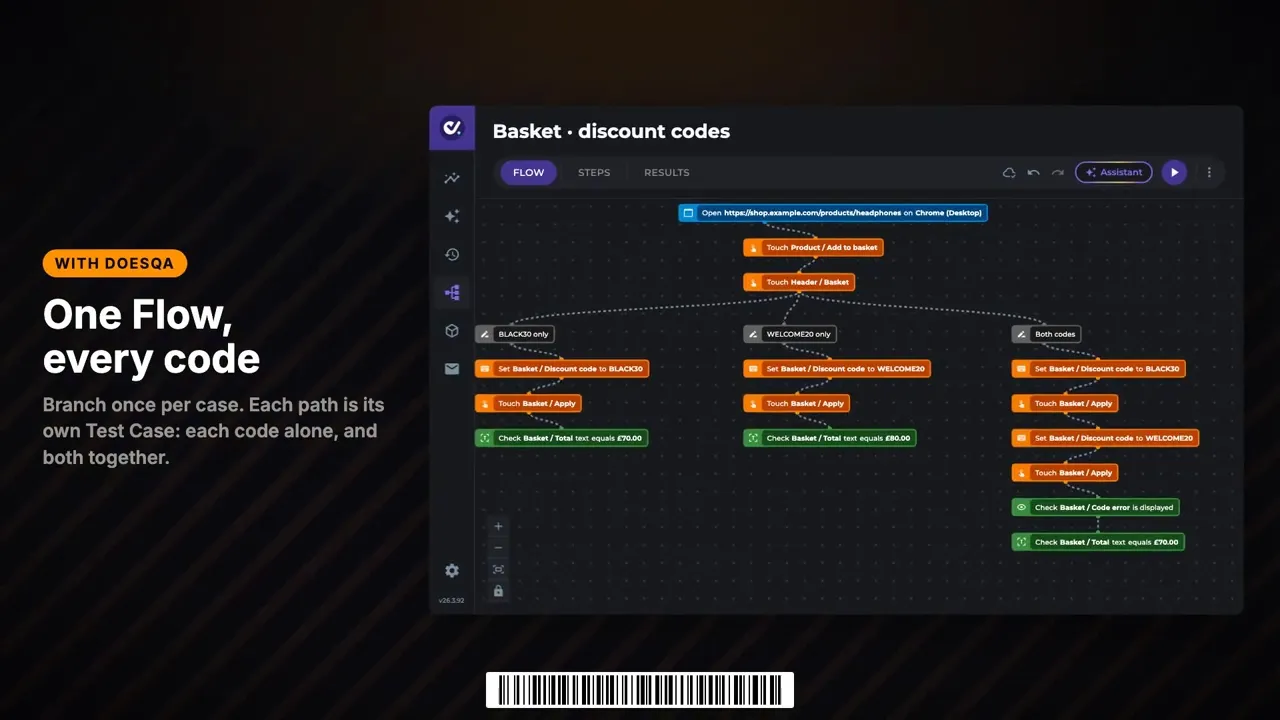
I want one Flow that tries every case: each code alone, and both together. Each path runs as its own Test Case, and a failure shows me the total and why. That is how you test discount code combinations in DoesQA.
Branch one Flow for every combination
Start with the shared journey: open the product, add it to the basket, open the basket. Split the Flow after the basket into three paths: code A, code B, and both codes. Each path runs as its own Test Case, and the shared steps stay in one place.
In the worked example, that is a 30% code, a 20% first-order code, and both together. Flow Branch shapes describe this as a later split: one Open, shared steps, then two or more onward paths. You edit the basket once. Every combination gets its own Result.
Enter a code and check the total
Open, Touch, Set Value to enter the code, then Check Text that the basket total reads £70.
On the 30% path, Set Value types the code and Check Text, with Comparison Type equals, expects £70. On the 20% path, the same Check Text expects £80. On the both-codes path, enter both codes, then Check Text that the total follows the one-code rule. In the worked example, that path fails because the basket shows £56.
Send Keys can press Enter after the code. Check Displayed can confirm an invalid code message when a second code should be rejected. The Check family covers every assertion on the basket.
Keep codes and totals as Values
Keep the codes and expected totals as Values and reuse them on every path.
Store them in the Value Store and insert them with $, for example $CODE_A and $EXPECTED_TOTAL. Set Value and Check Text accept Values, so a code change is one edit. Share data with Values shows how to insert them in steps. Run Recipes can override Values per Run, so staging and production can share the Flow and use different codes. Calculate Value can work out an expected total such as 20% off.
See the failing total and why
Open the failed Test Case in Run History to see the step timeline, the screenshot at the failing step, and video.
In the worked example, the both-codes case fails with a screenshot of the £56 total. Check steps take a screenshot On Failures by default, and you can set Always per step.
With Automation Intelligence on, a failed Test Case shows an AI Summary of what went wrong and what to try next. You can open the Assistant from it. Automation Intelligence summaries draw on the step data and screenshots in your account.
Check every combination on every Run
The same Test Cases run on every Run, whether from a Schedule, a Pack or your CI/CD pipeline, with results as Checks on your pull requests.
Start a Run from a Test Pack or a Run Recipe when a build lands. Put the Flow on a Schedule through the sale, so the same combinations are checked on the clock. Automated test scheduling in DoesQA and the CI/CD integrations page cover both routes.
Start with the codes you will ship
List the codes for the campaign. Add a path for each one, and a path that applies two at once whenever the rule is one code per order. Keep the codes and totals as Values. Turn on Automation Intelligence. Then every Run checks the combinations customers will try.
Flow Branch shapes, Set Value and Check Text are the docs for the path. Share data with Values covers the Value Store. DoesQA AI is the page for Automation Intelligence and the AI Summary.
Scheduled test runs with Slack alerts and AI summaries shows how to keep those Results arriving where the team already looks.
Start free trial. Cancel online.


