No guesswork. Just answers.
Everything you need to understand how DoesQA works, what it replaces, and how it helps you ship with confidence.
Most QA tools create more questions than answers.
Setup, scaling, reliability, cost. It all gets complicated fast.
DoesQA is designed to remove that complexity.
No infrastructure to manage
No flaky test maintenance
No stitching tools together
No lock-in
You get a system that works out of the box and answers you can trust.
If something’s unclear, it should be here.
Questions, answered.
What is DoesQA?
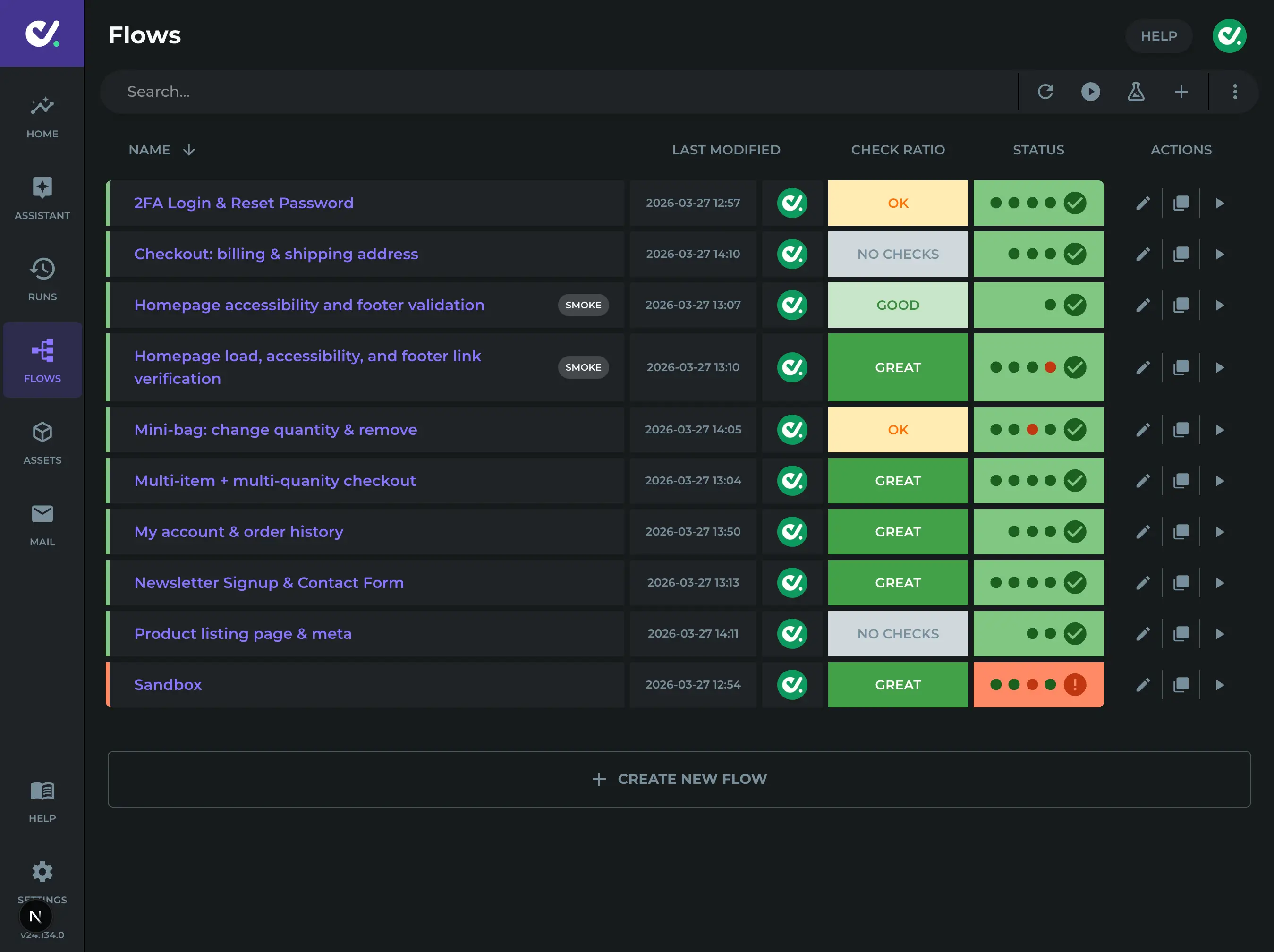
DoesQA is a codeless end-to-end test automation platform for web products. Build real user journeys as Flows, run them in parallel on hosted browsers, and review Results with screenshots and video, without maintaining a coded framework.
See the docs overview or start a trial.
Do I need to write code?
No. Flows are built from shared Test Steps in the Scenario editor and Flow Builder.
If you need a custom script in a rare place, that option exists. Most teams never need it.
More on the build model: Codeless vs coded.
Who is DoesQA for?
Teams that want strong end-to-end coverage without owning a second engineering stack for tests.
QA and automation testers who want speed and maintainability
Engineering teams who want CI gates and real browser evidence
Leads comparing tools who need journeys like email, MFA, and branching in one system
What types of testing can I do with DoesQA?
End-to-end testing of real user journeys in a real browser, including:
Login, MFA, and email verification
Payments and checkout
APIs and UI in one Flow
Branching journeys, accessibility, SEO, and performance Checks
This is not unit testing. It is the product-facing safety net. See Coverage and speed.
How much test coverage can DoesQA provide?
As much journey coverage as your product needs. If a person can do something in the product, your Tests should be able to do that too.
Measure coverage by real user journeys in the pack, not a tool scorecard. Coverage and speed.
What tools would we still need alongside DoesQA?
Keep unit tests and lower-level API checks where they already earn their keep. DoesQA is the end-to-end layer: real browsers, real journeys, hosted Runs.
Many teams also keep their CI system and chat alerts. DoesQA plugs into those. Codeless vs coded.
Does DoesQA help if we already have good automated test coverage?
Yes, when the remaining pain is end-to-end: email, MFA, frames, payments, flake, or runner ownership.
DoesQA can sit beside a mature stack for the journeys coded UI suites struggle with, without forcing a full rewrite. Coverage and speed.
What does DoesQA do that other tools can't?
It ships authoring, shared Test Steps, hosted runners, Results, email, MFA, and common journey capabilities as one product. You are not assembling that stack yourself.
Side-by-side example: DoesQA vs Playwright: the same test compared.
How is DoesQA different from Playwright or Cypress?
Playwright and Cypress are frameworks for writing browser tests. DoesQA is the full system teams usually end up building around them: visual authoring, runners, Results, and journey features included.
Why pay for DoesQA when Playwright is free?
Playwright is free to download. The expensive part is everything around it: runners, mail helpers, reporting, flake, and the people who keep that system alive.
DoesQA puts that in one product. The Real Cost of Playwright · DoesQA compared.
Is DoesQA just a wrapper around Playwright or Selenium?
No. DoesQA is the full stack: authoring, shared Test Steps, hosted runners, Results, schedules, and CI. A framework gives browser APIs; you still assemble the rest.
Is there vendor lock-in?
No. You can export your tests and take your work with you. No lock-in as a trap.
Export options are listed under "What can I export?"
What can I export?
You can export tests toward Playwright, Cypress, Selenium, and WebdriverIO as usable code when you need an exit path.
Why build in DoesQA if I might leave?
Because it is a fast way to build real journey coverage. Even if you leave later, you keep what you created and can export.
How reliable are DoesQA tests?
DoesQA is designed so a pass is shippable and a fail is real. Flows, Steps, runners, and Results are one platform. Every customer runs the same tried and tested Steps.
Does DoesQA produce flaky tests?
DoesQA is designed to be flake-free. Automatic waiting, fixed Selectors, and human-approved Selector updates mean red is something to investigate, not something to rerun until green.
How does DoesQA reduce flaky tests?
By removing common causes:
Shared Step behaviour instead of custom test code bugs
Fixed Selectors with a person in the loop (no silent self-heal)
Hosted runners in the same product as the Tests
Clear Run evidence so teams can stop on red
How much test maintenance does DoesQA require?
Not zero. Fast and centralised. Update a shared Element, Step Group, or Flow Branch once and many Test Cases move with it. Docs claim at least 400% faster maintenance than coded frameworks for the same journeys.
How quickly can DoesQA run a regression suite?
Test Cases run in parallel on DoesQA runners. With unlimited concurrency, large suites finish in the time the slowest paths need. Docs example: 935 Tests in about 29 minutes.
When would you not recommend DoesQA?
When your main job is not browser end-to-end testing (for example native mobile as the primary surface, or a pure unit-test problem).
When the job is web journeys in a real browser, DoesQA is built for that. Codeless vs coded.
If DoesQA is so much better why isn't everyone using it?
Most teams already invested in a coded stack. Switching has a cost, even when the old stack is expensive to keep.
DoesQA is growing because that cost of ownership is now obvious. The Real Cost of Playwright.
Is DoesQA really the best option or is that just marketing?
For end-to-end web journeys with low maintenance and trustworthy Results, DoesQA is hard to beat. For other jobs (unit tests, native-only apps), use the right tool for that job.
Can DoesQA run in CI/CD?
Yes. Trigger Runs from your pipeline, on a schedule, or on demand, with Results and alerts back to the team.
Do tests run in parallel?
Yes. Test Cases run in parallel on hosted runners so large packs finish faster. Concurrency depends on your plan.
What is a runner?
A runner is parallel execution capacity: how many Test Cases can run at the same time. More runners means faster feedback.
Do I need to manage runners or infrastructure?
No. Execution is fully managed inside DoesQA. No browser farm to build and no third-party remote runner to argue with.
How does DoesQA avoid AI hallucinations or unreliable results?
Runs stay deterministic. Pass and fail come from real browsers, stored Selectors, and shared Steps. DoesQA AI speeds triage and setup; it is optional. AI Vision is the intentional exception when you add that Step.
Does DoesQA train AI models on customer data?
DoesQA AI stays inside DoesQA in the UK. Learning is optional. When it is on, useful learning that applies more widely is generic, not your private account detail. You can turn AI off.
Is DoesQA secure?
DoesQA runs on AWS in the UK (eu-west-2), with encryption at rest and HTTPS for customer access. DoesQA holds and follows Cyber Essentials. Proven 99.9% uptime. Approved for use by the UK Government.
How does DoesQA handle credentials and secrets?
Use Private Values and MFA secrets in the product. After save, secret content stays hidden in the UI. Avoid putting production passwords or tokens in plain step text.
Can DoesQA safely test production systems?
Staging is best for full regression. Many customers also test production with careful URLs, Values, IP allowlists, and blocked hostnames.
Where is my data stored?
Infrastructure runs on AWS in the UK (eu-west-2). DoesQA LTD is registered in England and Wales.
Does DoesQA store our data?
Yes. DoesQA stores only what you provide for testing: Flows, Elements, Values, Run evidence (results, screenshots, video), and account settings. Run evidence is retained for 60 days. Account assets stay while the account is active.
Is DoesQA GDPR compliant?
DoesQA is aligned with UK GDPR, with UK hosting and GDPR rights including removal.
Is DoesQA suitable for enterprise use?
Yes. Enterprise teams use DoesQA for hosted Runs, clear platform ownership, Cyber Essentials, isolation controls, and optional AI that can be turned off.
What happens to my data if I cancel?
Your tests can be exported. Your account stays accessible unless you ask us to delete it. You keep Flows, reports, and Elements. You will not be able to run new Tests after cancel.
How does the trial work?
You get full access to the Starter plan for 7 days. No setup required. Start testing immediately. A cardless trial is also available.
Will I be charged during the trial?
No. Cancel anytime before it ends. No charges if you cancel in time.
How many parallel runners are included?
Starter includes 10 parallel runners, Growth includes 25, and Pro includes unlimited parallel runners.
DoesQA runs as many Tests in parallel as your plan allows.
What counts as a test step execution?
A test step execution is counted each time a billable step in your test executes.
Only steps that actually run count. Starter and Utility steps are never counted. Early stop helps you.
Why does DoesQA charge by test step?
By pricing this way, you know there will never be nasty surprises as your pack scales.
Some solutions look cheap or free when you run a small number of tests, then once you are locked in the price starts to explode. With DoesQA we start as great value for money and only get better with volume discounting.
How is my usage calculated?
Usage is based on billable test steps that actually execute. Steps that never run do not count. Starter and Utility steps are excluded.
What happens if I exceed my included usage?
With auto-upgrade enabled, DoesQA can move your account to the next plan as usage grows. Pro accounts can continue beyond included usage, with additional step executions at the overage rate.
Can I upgrade or downgrade later?
Yes. Move between plans as your requirements change. Auto-upgrade can move you up as usage grows when enabled.
Can I cancel without talking to sales?
Yes. Cancel anytime, fully online. No calls required.
How long does it take to get started?
Minutes. Add your site, build your first Flow, and run it.
How does DoesQA help engineering teams ship faster?
Faster test creation, parallel execution, clear coverage and failure context, and less framework maintenance. Less time managing QA, more time shipping.
What problems does DoesQA replace?
Maintaining coded frameworks, managing runners, unclear failures, and stitching side tools together. You get one system instead of more overhead.
Do I need a QA team to use DoesQA?
No dedicated automation-engineering team is required. People with basic automation knowledge can build and maintain DoesQA. Many engineering teams own it directly.
What kind of companies use DoesQA?
Teams of many sizes that ship often and cannot afford broken releases, including organisations that need UK hosting and strong security posture.
Can DoesQA test email registration, verification, and password reset?
Yes. DoesQA includes built-in test inboxes and Mail Test Steps. Enter $testEmail in your application, wait for the message, open it, and follow links in the same Flow. Guides: Email testing in DoesQA, Registration and verification, Forgotten password.
Do I need a separate email testing service with DoesQA?
No. DoesQA supplies Account and Test Case inboxes inside the product. Each Test Case Run can use its own $testEmail address so parallel tests stay isolated. External mail APIs are for teams wiring coded frameworks; DoesQA covers wait, open, click, and assert in the Flow.
Can DoesQA test passwordless or magic-link login?
Yes. The same Mail pattern applies: request the link, wait for email, open the message, and touch the sign-in link. See Passwordless login.
Can I inspect emails after a test finishes?
Yes. Open Mail in the DoesQA app to review Account or Test Case inboxes while you build, or after a Run to see what arrived during the test.
Can DoesQA generate fake user data for forms?
Yes. Built-in Values such as $testFirstName, $testLastName, $randomNumber, and $testEmail generate realistic data when you type $ in supported fields. Built-ins are native to DoesQA. Guide: Test data in DoesQA, Built-in Values.
Does DoesQA have a Value Store?
Yes. Account Values under Assets → Values hold shared config. During a Run, Data steps and API responses write to the Value Store so later steps can read the same names. Guide: Value Store, Test data in DoesQA.
Can DoesQA call APIs to set up test data?
Yes. Integration steps (GET, POST, PUT, PATCH, DELETE) run in the same Flow as your UI steps. Store the response and reuse fields in later steps. Guide: Test APIs in a Flow, Seed and clean up with API steps.
Do I need an external mock service with DoesQA?
For APIs you own, seed data with Integration steps against a test environment. When a dependency needs canned HTTP responses, store the mock base URL in a Value and call it from Integration steps. DoesQA integrates cleanly with mocking services you already run. Guide: Use mock servers with DoesQA.
How does DoesQA prepare test data for UI journeys?
Built-in Values fill forms. Account Values hold shared URLs and secrets. Integration API steps create and verify backend state in the same Flow as the browser. The Value Store carries captured data through the Test Case. Guide: Test data in DoesQA.