Visual Flows for real product complexity, without the maintenance tax of cloned suites.
Stop paying the copy-paste tax
Guest checkout and logged-in checkout should not mean two nearly identical suites. Edge cases should not multiply maintenance.
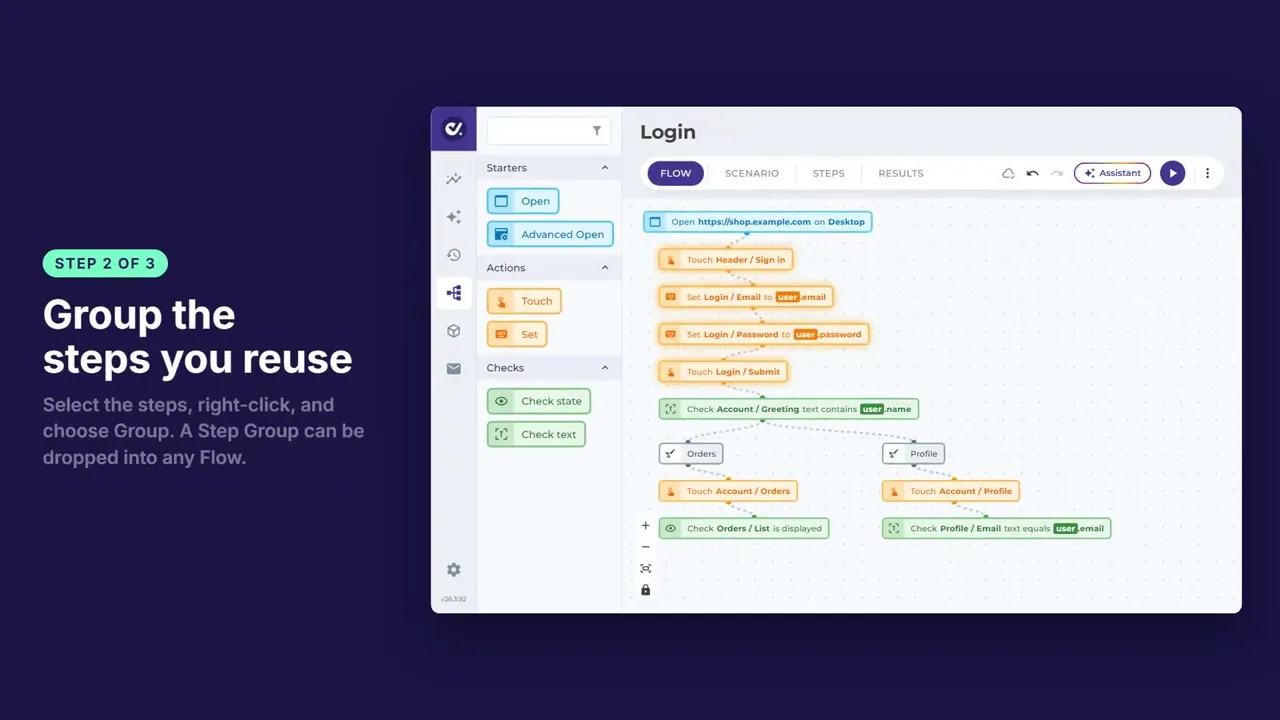
Flow Builder lets one Flow fan into many Test Cases through shared steps and branches. Product, QA, and engineering can look at the same canvas and agree what is covered.
Old habit | In Flow Builder |
|---|---|
Clone a suite per variant | Branch from shared steps |
Rewrite scripts when UI moves | Rearrange the journey on the canvas |
Login copied into every file | Step Groups keep setup in sync |
Coverage your whole team can read
Flow Builder uses the same Test Steps as the rest of DoesQA, laid out so larger journeys stay clear. Build, run, and open screenshots, video, and failure detail from the same place.
That clarity matters in reviews, audits, and the awkward question: what do we actually test before we ship?
Same test. More power when needed
Start in Scenario editor with plain-language sentences when you want a first green Run fast. Switch to Flow Builder for branches, reuse, and a clearer map. You are not rebuilding the test.
Pair with DoesQA AI for faster triage and Element setup, and with Features for the wider catalogue.
Coverage that grows with the product
If your suite only grows by cloning, every release makes tomorrow harder. Flow Builder turns branching product behaviour into maintainable automation.
